
Screenshots


App details
- Updated
- Nov 17, 2011
- Language
- English
- Developer
- AVG Technologies
- Category
- Mobile
SoftPas in:
This product is also available in the following languages:
About AVG LinkScanner
Download AVG LinkScanner – Web Security, URL Scanner, Online Safety, Anti-Malware, Safe Browsing
Overview
AVG LinkScanner is a supplemental security tool designed to enhance online safety by evaluating the risk level of web pages before users access them. Its primary purpose is to provide an additional layer of protection during internet browsing, helping users avoid potentially malicious websites, phishing attempts, and malware distribution points. By analyzing URLs in real time, AVG LinkScanner supports informed decision-making, particularly for individuals who frequently navigate unfamiliar or high-risk web environments.
The app targets users seeking improved digital hygiene, including remote workers, online shoppers, and general internet users concerned about cyber threats. It functions as a companion to existing antivirus software, not a replacement, offering proactive defense through URL inspection. While the developer, AVG Technologies, is known for its security solutions, specific background details about the company’s broader product strategy were not provided in the input.
Real-world use cases include verifying the legitimacy of links received via email or social media, checking search engine results for hidden threats, and safeguarding sensitive data during online transactions. In the broader app ecosystem, AVG LinkScanner fills a niche for browser-based security utilities, especially in environments where users rely on third-party tools to extend the capabilities of their primary antivirus protection.
Key Features & Functionality
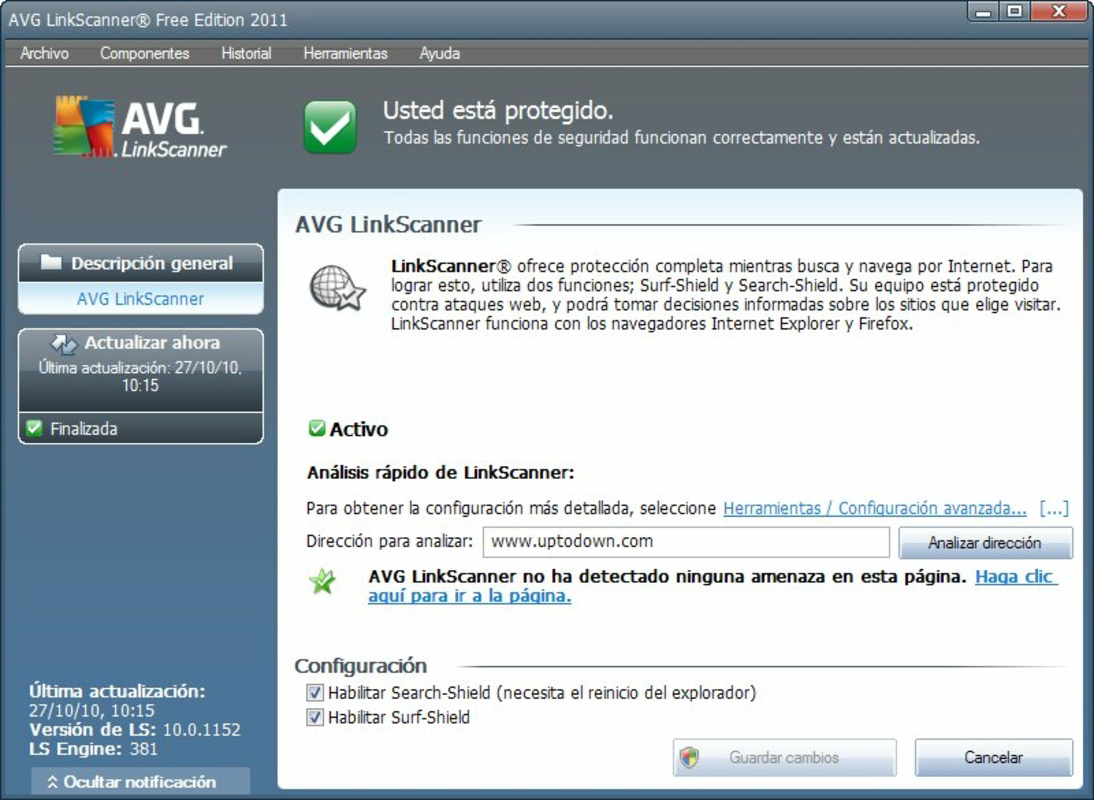
- Website Safety Check: Users can manually enter any URL into AVG LinkScanner to receive an instant security rating. This feature is particularly useful when evaluating unfamiliar links, such as those from unsolicited messages or advertisements, allowing users to assess risk before clicking.
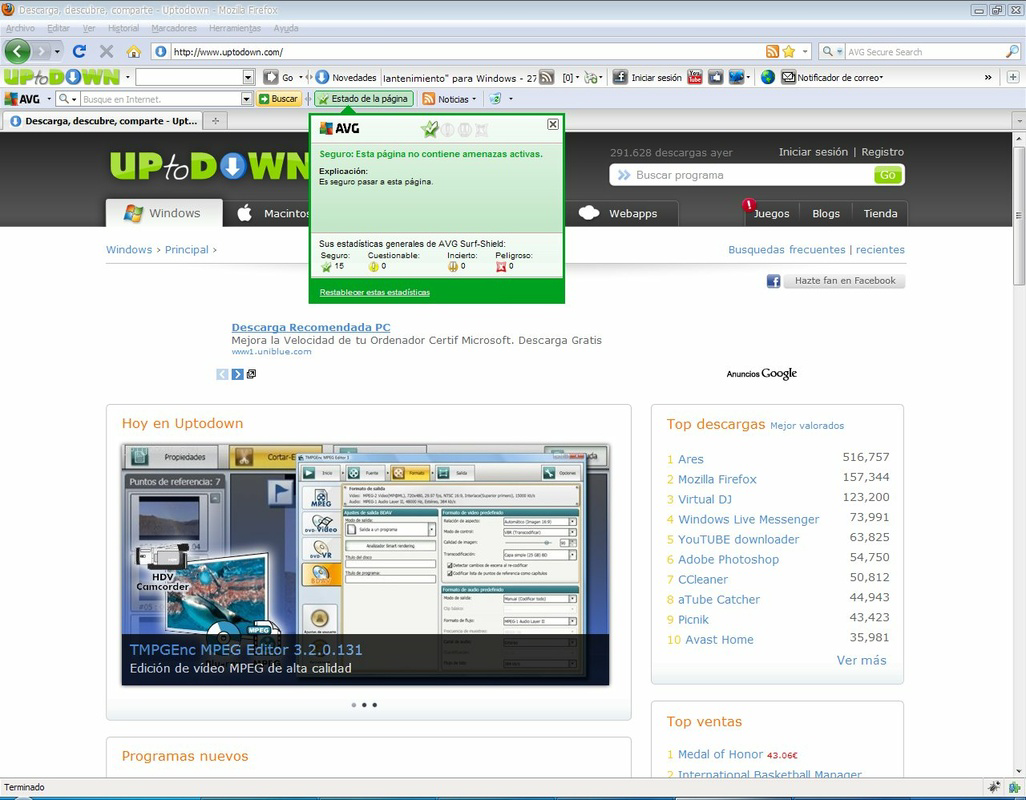
- Search Engine Integration: The tool integrates with standard search engines, displaying security icons next to each result. This enables users to quickly identify which links are safe, potentially risky, or known threats, improving decision-making during online research.
- Toolbar Installation Requirement: Full functionality depends on installing the AVG toolbar, which is required to enable real-time scanning and integration with the browser. Although this may be seen as a barrier for some users, the toolbar is designed to operate without disrupting the browsing experience.
- Complementary Security Layer: AVG LinkScanner works alongside existing antivirus software to strengthen overall protection. It does not replace core antivirus functions but adds proactive URL-level defense, especially valuable in environments where web-based threats are prevalent.
- Compatibility Awareness: The tool is not compatible with all antivirus programs. Users are advised to verify compatibility before installation to ensure seamless operation and full access to its features.
These features collectively support safer browsing habits by empowering users with actionable intelligence before they encounter potential threats. For example, a user researching a software download can check the URL of the source site to confirm it is free from malware, reducing the risk of infection.
Interface, UX & Performance
The user interface of AVG LinkScanner is designed for clarity and minimal disruption. It presents security ratings in a simple, icon-based format—typically using color-coded indicators such as green for safe, yellow for caution, and red for dangerous—making it easy to interpret at a glance.
Navigating the tool is straightforward: users either input a URL directly or rely on integrated search engine results. The workflow is linear and intuitive, with minimal steps required to receive a security assessment. The interface does not overload users with technical jargon, focusing instead on actionable outcomes.
Although the developer did not list formal performance metrics, the tool is described as non-intrusive, suggesting it operates efficiently in the background without significantly impacting browser speed or system resources. Responsiveness is expected to be consistent across standard Windows devices, though specific performance data for low-end or high-end hardware was not disclosed.
Stability appears to be maintained through its integration with the AVG ecosystem, but users may experience inconsistencies if the toolbar is not properly installed or if conflicts arise with other browser extensions. Overall, the UX prioritizes simplicity and functionality over visual flair.
Platform Compatibility & Technical Requirements
AVG LinkScanner is available exclusively for the Windows platform. The application requires a Windows operating system, though specific version requirements were not listed by the developer. This limits its use to desktop environments and excludes mobile or tablet users.
The app has a file size of 10.5 MB, indicating a lightweight installation that should not impose significant storage demands on most systems. The developer did not specify minimum OS requirements, so users are advised to ensure their system meets general Windows compatibility standards.
Given the tool’s reliance on the AVG toolbar, installation may vary depending on the user’s browser and system configuration. Compatibility with different versions of Internet Explorer, Chrome, or Firefox was not detailed in the input, so users should consult official documentation for precise support information.
Pros and Cons
Pros
- Provides real-time URL safety ratings to prevent access to malicious websites.
- Integrates seamlessly with popular search engines, enhancing browsing safety.
- Non-intrusive design minimizes disruption to the user’s workflow.
- Acts as a valuable supplement to existing antivirus software.
- Free to download and use, making it accessible for a wide audience.
Cons
- Requires installation of the AVG toolbar for full functionality, which may deter some users.
- Compatibility with certain antivirus programs is limited, potentially restricting use.
- Platform is restricted to Windows only, excluding mobile and macOS users.
- Specific system requirements were not disclosed, which may lead to installation uncertainty.
- No detailed performance metrics were provided by the developer.
FAQ
Is AVG LinkScanner safe to install?
Yes, AVG LinkScanner is developed by AVG Technologies, a recognized name in cybersecurity. The tool is designed to enhance security and does not contain known malicious components.
Do I need to pay to use AVG LinkScanner?
No, the app is available for free. There are no subscription fees or in-app purchases required to access its core features.
Can I use AVG LinkScanner without the AVG toolbar?
Partial functionality may be available, but full features—including real-time scanning and search engine integration—require the AVG toolbar to be installed.
Is AVG LinkScanner compatible with all antivirus software?
No, compatibility is limited with certain antivirus programs. Users should verify compatibility before installation to ensure optimal performance.
How often does AVG LinkScanner update its threat database?
The update frequency was not specified in the provided information. Users should rely on the automatic update mechanisms within the AVG ecosystem for current threat intelligence.
Final Thoughts + CTA
AVG LinkScanner stands out as a focused, practical tool for users who prioritize online safety but may not have access to comprehensive browser-level security solutions. Its ability to evaluate URLs in real time and integrate with search engines offers tangible benefits for everyday browsing, especially in high-risk digital environments.
While its dependency on the AVG toolbar and limited platform support are notable drawbacks, the app’s lightweight design, free access, and straightforward functionality make it a worthwhile addition for Windows users. It excels as a supplemental security layer, particularly for those already using AVG’s antivirus suite or seeking an affordable way to enhance their digital protection.
For individuals who value proactive threat prevention and want a simple, effective way to verify web links before visiting them, AVG LinkScanner delivers real value. Despite its age and lack of modern updates, it remains a functional utility in the right context.
Download AVG LinkScanner now
Guides & Tutorials
How to install AVG LinkScanner
- Click the Download button above.
- Once redirected, accept the terms and click Install.
- Wait for the AVG LinkScanner download to finish on your device.
How to use AVG LinkScanner
This software is primarily used for its core features described above. Open the app after installation to explore its capabilities.
User Reviews
No reviews yet. Be the first to share your experience.
You may also like
more
Que no te pillen¡
About !Que no te pillen¡Reviewed by Jason A. BilbreyShow MoreShow Less

3D Combat Zone
About 3D Combat ZoneOriginally released in 1983, 3D Combat Zone immerses players...

666: El día del portal
About 666: El día del portalOn June 6, 2006, Agent P. Stone uncovers a sinister...

80 in 1 Best Flash games
About 80 in 1 Best Flash games 80 in 1 Best Flash games is a collection of 80 fl...

ABYSS SEEKERーーWhat Do You See Deep in The Abyss
About ABYSS SEEKERーーWhat Do You See Deep in The AbyssIn ABYSS SEEKER, players...

ACA NEOGEO THE KING OF FIGHTERS 2002 for Windows
About ACA NEOGEO THE KING OF FIGHTERS 2002 for WindowsTHE KING OF FIGHTERS 2002,...